RUNDE'S ROOM: SMARTboard

Showing posts with label SMARTboard. Show all posts

Save Yourself Some Merry Little Minutes

30 November 2014
I'm back with my favourite group of upper grade bloggers to share some of our time-saving secrets with you in hopes of helping you gain back some precious "merry little minutes" in the crazy busy upcoming month.  Let's face it, we can all use some extra minutes (or hours, or days) - especially in December.

These tips are not only good for the month of December, but all year long.

My time-saving tip is all about pre-made templates for lessons and routines that are often repeated in your classroom.  It saves time in so many ways - the template is already ready to go, no extra time in making up something.  After the initial time making the template, I just save it to my desktop so I can pull it up in a second without looking through my files for it.  The blank template is already saved so I just have to exit at the end of the lesson.  We're using the Smartboard (or whiteboard) together, so there are no handouts to pass out or collect.  Time saved during prep, before the lesson, and after the lesson.

math educationThis is a template I made for our daily number talks.  I had originally started doing our number talks in a notebook, with students copying down everything, but I soon realized we were all wasting valuable time writing everything down, and not as much time practising the actual skills - something that we needed to maximize in the short 10 minute daily number talk.  I made this template with the notebook software for the smartboard, but it could be just as quickly and easily made with powerpoint or even word.  All I needed to do was fill in a new question every day, and then we let the template take us through the rest of the lesson - each day using this same template.  You can't see in this picture, but at the bottom of this template I had an empty space where I would write extra questions (taken from the Number Talks book) where we could quickly practise the skills we learned in the lesson.


math educationThis is another quick and easy template I made for our Error Analysis minilessons.  We used this template 2 to 3 times a week, and it always stayed the same so I could pull it up quickly, analyze a common error I had seen in the lesson, and move on.  I made this one quickly in the notebook software, too.  I could pull up the screen in a minute (already saved to my desk top) and fill in the question and error - which often made for a timely teachable moment during independent or small group work.


I made this template on Dollar Words while we were reading Because of Mr. Terupt.  My students loved the idea of making dollar words, and I wanted to make it fun and easy.  I would pull up this template and they could add the words they figured out during the day (and they were constantly thinking of dollar words through the day while we were reading this book).  (It would make a great literacy station or indoor recess activity, too).


I also used these premade templates for some of our learning goals.  We were piloting the use of Surface tablets in my classroom last year, and had to document our technology learning goals each day.  I made a quick template with a tablet picture and title, and could quickly pull it up and change our learning goal each day.  I would project it while students were using the tablets each day.


Check out some more time-saving ideas and save yourself some merry little minutes this season.  Click on any of the blog buttons below to start your time-saving journey.  :)


6

Enjoying the Holidays ...

05 July 2012
I've been off for a week ... and it feels GREAT!!!  Haven't posted in a bit, but I've been busy with the family - and I wouldn't trade those moments for anything!

We spent a bit of time at the cottage over the Canada Day weekend.  Here's a pic of my girls on Canada Day - for some reason, they always agree to dress alike on Canada Day.  They're 4, 6, and 8 right now - gotta dress them up while I can ... for some reason I can't see them agreeing to this in 10 years when they're 14, 16, and 18.  ;)

We've also been keeping busy with soccer.  My husband and I are coaching my oldest daughter's soccer team this year - we had 3 games last week (won all 3!!!) and have a tournament coming up this weekend.

I hope you've been joining us for our Daily 5 / CAFE book study over at We Read, We Blog, We Teach.  We have two chapters posted so far, and in addition to the fantastic posts, the amount of ideas and suggestions in the comments section is mind-blowing!!!  I've had to start a notebook to record some of these fantastic ideas.  I can't wait to start planning on what this is all going to look like in my classroom.

And if one book study wasn't enough, I jumped into another.  My good friend, Kim, has the most amazing posts about the Guided Math book over at Finding Joy in Sixth Grade.  You can read more about the book study and organization at her link.  All I can say for now is ... guess what book I got in the mail yesterday???

I've also been hard at work on my Interactive Math Journal resource.  I'm also done all of the introduction and assessment stuff, and am just about to start on the entries and templates.  It's keeping me quite busy.  For a little break, I decided to work on a Parts of Speech product using my Crystal Ball Template.  I just posted it last night.  This is a SMARTboard file with 20 multiple choice questions for the 8 parts of speech - when an answer is pressed, the page links to a page where it is "magically" revealed on the crystal ball whether the answer is correct or incorrect.  You can take a peek and download the preview by clicking on the picture below.

Well, that's about it ... just a quick update for now.  I still plan on doing my FAQ post for my math journals ... just let me get through the soccer tournament this weekend.  Whew!!!  I'm going to need a holiday from my holidays!!!

12

Word Walls and Crystal Balls

12 June 2012
Word Walls and Crystal Balls ... can you tell we were discussing rhyme schemes in poetry today?  Anyway, this post has nothing to do with poetry ... just wanted to intrigue you with the title.  Did it work?

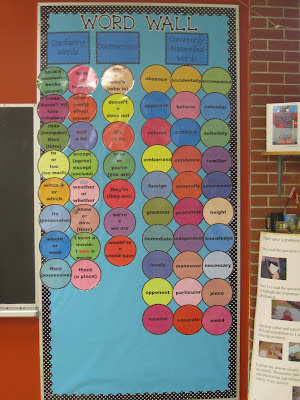
photo of Upper Grade Word Wall @ Runde's Room
Lately I've been reflecting on my word wall.  I LOVE my word wall, and LOVE how it looks in my room, but I don't think I've done enough to make my students interact with it this year.  They're not using it as much as they should ... and I'm seeing spelling mistakes that they just shouldn't be making.  So I decided to do something about it.  Given my students obsession with my cootie catchers, I decided to make a package of cootie catchers designed to get them to interact and USE the word wall.  I'm going to hang an envelope on the word wall, and stuff it full of cootie catchers.  Every few weeks, when we have a few extra minutes, I'm going to get my students to pair up and grab a cootie catcher (I have 7 different ones in the package) to practice and actually USE the wall.  Hopefully, those little mistakes that drive me crazy will start to vanish.

You can click on the picture below to take a peek at my newest set of cootie catchers.
photo of Word Wall Cootie Catchers @ Runde's Room


OK - so on to the crystal ball.  This is a product I've been working on for a while - all the page linking and animating took quite a bit to complete.  I wanted a SMARTboard lesson with a little WOW factor for the students, and I wanted it to be self-correcting so I could use it as a language center next year (already thinking about my working with words centers for the Daily 5 next year) if I was conferring with another student.  I made this lesson to practice synonyms and homonyms (getting a little extra vocabulary in, too).  You can click on the image to the right to preview it at my TPT store, but you can also take a peek at how it works on the video below (I've just recently starting using the movie capture tool with the notebook software).  I'd like to make more language centers with this same crystal ball template - I'm thinking parts of speech may be next ... what do you think?  Any ideas?


Happy Tuesday!!!
8

December - My Favourite Month

01 December 2011
Oh my goodness - how is it possible it's December already?  Not that I'm complaining - December is my all-time favourite month!  I don't even mind the snow in December (however, I'm not a fan of it any other month).  To bring in December properly, I've got a FANTASTIC resource for you!  Rachel, from Minds in Bloom, has put together an amazing Holiday ebook containing tips and free resources from 50 TeachersPayTeachers authors (myself included).  Each page is created by a different seller and contains a holiday tip and a link (clickable through the pdf) for at least one freebie.  Click on the picture to the right to download your own copy.  You're going to want to tell your friends about this one!!!


Let the December activities begin ... my girls were so excited to open their advent calendars today!  And I kept that excitement going at school with my SMARTboard Advent Calendar.  Today was a VERY busy (but very good) day, so I picked a short anagram activity, and my kids LOVED it!  I have to admit, I was SHOCKED that three of my students (grade 6!!!) couldn't spell Christmas - I told them they better practice it, because Santa won't come to their house if they can't spell Christmas ;)

Click on the picture to the left for a preview of this activity.


After school my girls and I worked on a cute little Christmas craft while the hubby was out shopping.  LOVE our little snowmen - so cute - and it was a great little impromptu craft as we already had all the supplies in our craft bucket at home.


I've pinned so many fun Christmas craft ideas, I can't wait to make some of them with my girls ... I'm going to try to make each weekend before Christmas ... I miss my pinterest inspired crafts from the summer ... :)

Happy Thursday - and Happy December!!!
4

Some Spooktacular Halloween Ideas

19 October 2011
Oh my goodness - what a week (make that two weeks)!  CRAZY!  I feel bad about not keeping up with my regular posts, but I promise to be back on Friday with a fabulous art feature and then again on Sunday with our math journals.  I also hope to have finished our personal memoirs book which I am so anxious to share with you.

Today I want to share a few Halloween lesson ideas with you.  Last night I finished and posted a FREE Halloween Writing Prompts activity to my TPT store.  There are four different writing prompts included in this freebie:  fictional narrative, procedural writing, news article, and a journal entry or personal memoir.  I let my students have their choice of what writing prompt they wanted to use, and they are so excited to finish their rough copies, so they can use the special writing paper.  Click on the picture below to download your own copy.


While you're visiting my store, you can check out some of my other Halloween products.  Click on the pictures or the title to get the link.

Halloween Drama Circles.  I really enjoy watching the kids during this activity.  So much fun!

Halloween Mad Libs for the SMARTboard.  Definitely a favourite of my students!  They LOVE it!

Halloween Kooshball Template for the SMARTboard.  Includes 20 linked slides perfect for review or fun questions.  All you need to do is enter the questions.


Happy Wednesday!  And I'll see you back on Friday with a Fabulous Art Feature!

Other Fall-Themed Resources:


6